Unlock the full potential of your Roblox games by mastering RemoteFunctions, the crucial component for seamless client-server communication. This comprehensive guide delves into how RemoteFunctions work, why they are essential for secure and interactive game development, and practical steps for implementing them effectively. Whether you are building complex multiplayer systems, creating dynamic in-game events, or optimizing performance, understanding RemoteFunctions is vital for every aspiring and experienced Roblox developer. We address common setup issues, performance bottlenecks, and security best practices, ensuring your game provides a smooth and engaging experience for players. Learn to synchronize actions, manage data, and prevent exploits efficiently, turning development challenges into opportunities for innovation. This resource is tailored for busy gamers who enjoy building and want to elevate their creations.
How do Roblox RemoteFunctions enable client and server communication?
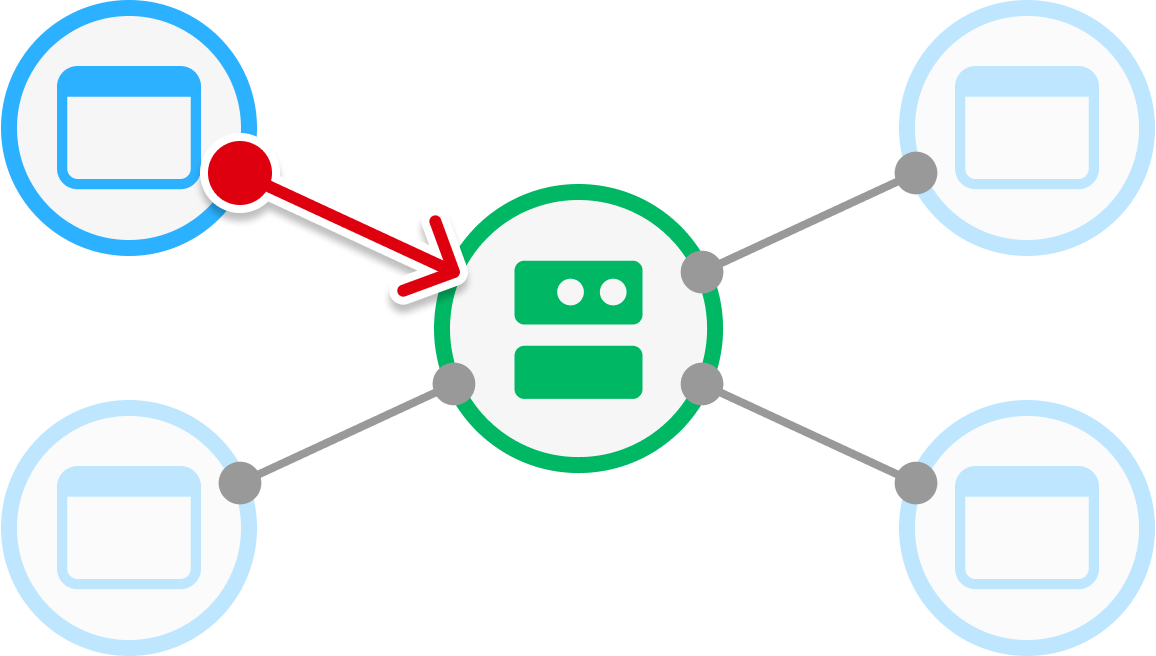
Roblox RemoteFunctions act as a bridge, allowing your game's client (player's device) and server (game's central logic) to communicate synchronously. When a client wants to ask the server for information or to perform an action that requires a response, it 'invokes' a RemoteFunction. The client script then pauses, waiting for the server to process the request and send back a result. This makes RemoteFunctions essential for interactive gameplay where immediate validation or data retrieval is necessary, like confirming a purchase or checking player stats securely.
What are the primary use cases for RemoteFunctions in Roblox development?
RemoteFunctions are primarily used for scenarios demanding a request-response pattern. This includes validating client actions on the server (e.g., checking if a player can afford an item), retrieving server-authoritative data (e.g., current game scores, player inventory), or performing secure server-side calculations (e.g., damage calculation). They ensure game integrity by having the server confirm or deny client-initiated events, making them a crucial tool for building fair and robust Roblox experiences.
Why is server-side validation crucial when using RemoteFunctions?
Server-side validation is absolutely crucial with RemoteFunctions because the client can be easily exploited or manipulated. Any data sent from a client via a RemoteFunction cannot be trusted at face value. Without server-side validation, a malicious player could, for instance, tell the server they have infinite money or that they want to teleport anywhere. The server must independently verify all client requests and data, checking for legitimacy, authorization, and reasonable bounds, to prevent cheating and maintain game security.
How can I prevent common security exploits with RemoteFunctions?
To prevent common security exploits with RemoteFunctions, always adhere to the 'Never Trust the Client' principle. Implement rigorous server-side validation for all client-sent data and requests. This means checking if the player is authorized, if the requested action is possible, and if the provided data is within expected parameters. Additionally, employ rate limiting to prevent spamming, sanitize any client inputs, and use `pcall` to handle unexpected errors gracefully. These practices create a robust defense against exploit attempts.
What is the difference between RemoteFunction:InvokeServer() and RemoteFunction.OnServerInvoke?
RemoteFunction:InvokeServer() is called from the client to send a request to the server and await a response. It is the 'caller' side of the communication. RemoteFunction.OnServerInvoke, on the other hand, is an event that is connected on the server-side. It defines the function that will execute when a client calls InvokeServer(). The code connected to OnServerInvoke performs the server's logic, processes the client's request, and then returns a value back to the client.
How do you handle potential network latency when using RemoteFunctions?
Handling network latency with RemoteFunctions involves careful design choices. Since `InvokeServer()` pauses the client script, frequent calls for non-critical updates can make the game feel sluggish. For such scenarios, consider using RemoteEvents (asynchronous). For critical synchronous calls, ensure the server-side logic invoked by the RemoteFunction is as efficient as possible to minimize processing time. Avoid sending excessively large data payloads. Providing visual feedback (like loading spinners) during waiting periods can also improve player experience, making the latency feel less impactful.
Are there best practices for organizing RemoteFunctions in a large Roblox project?
Yes, for large Roblox projects, organizing RemoteFunctions is key for maintainability. A common best practice is to store all RemoteFunctions within `ReplicatedStorage` to ensure accessibility from both client and server. Naming conventions are also vital; use clear, descriptive names for each RemoteFunction that indicate its purpose (e.g., 'PurchaseItemRF', 'RequestPlayerStatsRF'). Grouping related functions into subfolders within `ReplicatedStorage` can further enhance organization, making your codebase easier to navigate and manage as your game grows in complexity.
Are you a gamer who loves diving into Roblox Studio to create your own worlds, only to hit a wall when trying to make your creations truly interactive and secure? Many of us, balancing gaming with jobs, families, and life, find that the initial joy of building can quickly turn into frustration when things do not quite communicate as expected between player and server. You are not alone. In the vibrant US gaming scene, where 87% of gamers regularly spend 10 plus hours a week across mobile and PC platforms, a smooth and secure gameplay experience is paramount. This challenge often boils down to a core concept in Roblox development: RemoteFunctions.
RemoteFunctions are the unsung heroes of seamless Roblox experiences, allowing your game clients and the server to talk to each other reliably and securely. Imagine trying to build a complex multiplayer game where player actions on their screen cannot reliably tell the server what is happening, or vice versa. It would be a chaotic mess! This guide is designed to cut through the jargon and provide clear, actionable insights into mastering RemoteFunctions, helping you overcome common setup issues and performance problems. We will explore everything from what they are to how to implement them securely, ensuring your game runs like a dream and keeps players engaged, even those with limited time for gaming who value efficient, fun experiences.
What Exactly Are RemoteFunctions in Roblox Development?
RemoteFunctions in Roblox are special objects that facilitate synchronous communication between the client (a player's game instance) and the server (the central game logic). Unlike RemoteEvents, which are fire and forget, RemoteFunctions allow the sender to request information or a result from the receiver and then wait for a response before continuing. Think of it like making a phone call and waiting for the person on the other end to answer and give you the information you need, rather than just shouting a message into the void. This synchronous nature makes them incredibly powerful for operations where a response is immediately required, such as checking inventory, verifying player actions, or requesting complex calculations.
How Do RemoteFunctions Differ from RemoteEvents and Why Does It Matter?
The key distinction lies in their communication pattern: RemoteEvents are asynchronous, while RemoteFunctions are synchronous. When you fire a RemoteEvent, the sender does not wait for a response; it just sends the message and moves on. This is great for actions like a player picking up an item where no immediate feedback beyond the item disappearing is needed. RemoteFunctions, however, pause the sender's script until a response is received from the receiver. This synchronous exchange is critical when the sender needs to make decisions based on the receiver's reply. For example, if a player tries to buy an item, the client might call a RemoteFunction on the server to ask, "Does this player have enough currency?" The client then waits for the server's definitive 'yes' or 'no' before proceeding to deduct currency or display an error. Understanding this difference is fundamental for choosing the right tool for the right job, crucial for optimal game performance and responsiveness, especially as modern games demand more intricate interactions.
When Should You Use RemoteFunctions Over RemoteEvents in Your Roblox Game?
You should prioritize RemoteFunctions whenever your client-side script needs an immediate, specific response from the server before it can proceed, or vice versa. Common scenarios include:
- Verifying Player Actions: Confirming if a player has enough resources to perform an action (e.g., buying an item, building a structure).
- Retrieving Server-Side Data: Asking the server for up-to-date player statistics, inventory contents, or game state information.
- Complex Calculations: Offloading heavy computations that should only be done on the server (e.g., damage calculations in a secure way).
- Custom RPC-like Calls: When you need a direct request-response pattern similar to a remote procedure call (RPC) for specific game logic.
Using a RemoteFunction ensures that the client's action is validated by the authoritative server, greatly enhancing security and preventing exploits. For busy developers, choosing the correct remote object saves immense time troubleshooting security vulnerabilities later on.
What Are the Security Risks Associated with RemoteFunctions and How Can I Mitigate Them?
RemoteFunctions, if not handled carefully, can be significant vectors for exploits. Since clients can initiate calls to the server, malicious players might try to send manipulated data or request unauthorized actions. The primary risk is trusting client input. To mitigate these risks, always follow these security best practices:
- Never Trust the Client: This is the golden rule. Any data sent from the client must be thoroughly validated on the server. Do not assume the client is sending legitimate values.
- Implement Server-Side Validation: Before acting on any client request via a RemoteFunction, always check parameters on the server. For example, if a client requests to jump higher, the server must verify if the client is allowed to do so and if the requested jump height is within reasonable bounds.
- Rate Limiting: Prevent spamming. Implement checks to limit how frequently a client can call a specific RemoteFunction.
- Sanitize Inputs: Ensure any strings or data received from the client are clean and do not contain malicious code or unexpected characters.
- Use Unique Names: For critical RemoteFunctions, consider using less predictable names to make them harder for exploiters to guess.
Adhering to these principles is not just good practice; it is essential for building a robust and secure Roblox game that stands the test of time and keeps your community safe, which is a major concern for today's social gamers.
How Do You Create and Implement a Basic RemoteFunction in Roblox Studio?
Implementing a RemoteFunction involves setting it up in your game and then calling it from either the client or the server.
Step 1: Create the RemoteFunction
In Roblox Studio, go to the Explorer window. Right-click on ReplicatedStorage (the common place for remotes) > Insert Object > RemoteFunction.
Step 2: Scripting the Server-Side Listener (Function Called from Client)
In a Server Script (e.g., in ServerScriptService):
local ReplicatedStorage = game:GetService("ReplicatedStorage")local MyRemoteFunction = ReplicatedStorage:WaitForChild("MyRemoteFunction")
MyRemoteFunction.OnServerInvoke = function(player, arg1, arg2) print(player.Name .. " invoked MyRemoteFunction with: " .. arg1 .. ", " .. arg2) -- Perform server-side logic and validation here local result = arg1 + arg2 return result -- Return a value back to the clientend
Step 3: Scripting the Client-Side Caller
In a Local Script (e.g., in StarterPlayerScripts):
local ReplicatedStorage = game:GetService("ReplicatedStorage")local MyRemoteFunction = ReplicatedStorage:WaitForChild("MyRemoteFunction")
local success, result = pcall(function() return MyRemoteFunction:InvokeServer(10, 5) -- Pass arguments to the serverend)
if success then print("Server returned: " .. result) -- This will print 15else warn("Error invoking server: " .. result)end
Remember to always wrap client-side InvokeServer calls in `pcall` (protected call) to handle potential errors gracefully, such as if the server disconnects or errors during the function call. This structured approach helps in building scalable and error-resilient games, a key aspect for gamers who appreciate polished experiences.
Can RemoteFunctions Be Used to Call the Client from the Server? If so, How?
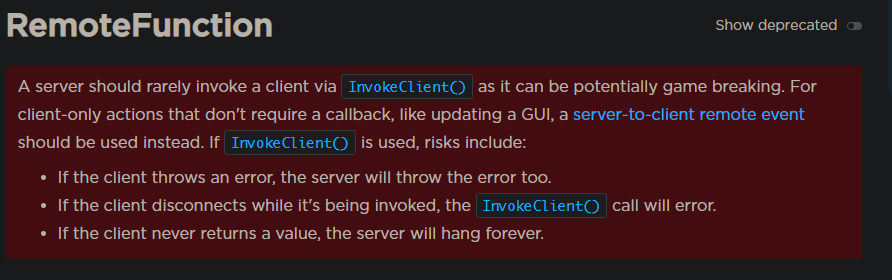
Yes, RemoteFunctions can absolutely be used to call a specific client from the server, but the method differs. When the server needs to invoke a function on a client and receive a response, it uses `RemoteFunction:InvokeClient(player, ...)`. This is less common than client-to-server calls but is vital for specific scenarios where the server needs client-side data or action confirmation.
Server-Side Caller:
local ReplicatedStorage = game:GetService("ReplicatedStorage")local MyRemoteFunction = ReplicatedStorage:WaitForChild("MyRemoteFunction")
-- In some server script, when you need to call a client:local function handlePlayerRequest(player) local success, clientData = pcall(function() return MyRemoteFunction:InvokeClient(player, "RequestData", "Inventory") end)
if success then print(player.Name .. "'s client responded with: " .. clientData) else warn("Error invoking client: " .. clientData) endend
Client-Side Listener (Local Script):
local ReplicatedStorage = game:GetService("ReplicatedStorage")local MyRemoteFunction = ReplicatedStorage:WaitForChild("MyRemoteFunction")
MyRemoteFunction.OnClientInvoke = function(command, param) print("Server invoked client with: " .. command .. ", " .. param) if command == "RequestData" and param == "Inventory" then -- Gather client-side inventory data local clientInventory = "Sword, Shield, Potion" return clientInventory -- Return data to the server end return "Unknown Command"end
The server must specify which `player` to invoke. This powerful pattern is used when server logic needs to react to client-specific information that only the client can provide, such as local graphical settings or unique client-side states.
What are the Performance Considerations when Using RemoteFunctions?
While RemoteFunctions are powerful, their synchronous nature means that the calling script pauses and waits for a response. This introduces potential performance bottlenecks if not managed correctly. Key considerations include:
- Latency: Network latency can cause significant delays. If a client calls a RemoteFunction on the server, the script must wait for the message to travel to the server, be processed, and then travel back to the client. Overuse of RemoteFunctions for non-critical, high-frequency actions can lead to a sluggish or unresponsive game.
- Blocking Scripts: A script calling `InvokeServer` or `InvokeClient` is blocked until a response is received or a timeout occurs. If the invoked function on the other side takes too long or errors, it can cause the calling script to freeze or error, impacting the user experience.
- Payload Size: Sending large amounts of data through RemoteFunctions can consume bandwidth and increase latency.
To optimize performance, use RemoteFunctions judiciously for critical, low-frequency, request-response operations. For frequent updates or non-critical messages, RemoteEvents are usually the better choice. Monitoring your game's network usage in Roblox Studio's Developer Console can help identify areas for optimization, ensuring your game remains responsive and fun, even for gamers on less-than-ideal connections.
Are There Any Common Pitfalls or Mistakes to Avoid with RemoteFunctions?
Absolutely! Even experienced developers can fall into these traps:
- Over-reliance on RemoteFunctions: Using them for every piece of communication can lead to performance issues due to latency and blocking scripts.
- Lack of Server-Side Validation: This is the biggest security hole. Always validate client input. Never trust data coming from the client.
- Not Using `pcall` for `InvokeServer`/`InvokeClient`: Failing to wrap calls in `pcall` means unhandled errors on the invoked side will crash your calling script, leading to unexpected behavior and potentially frustrating game interruptions.
- Sending Sensitive Data Client-Side: Never send information that should only be known to the server (like admin passwords or secret game logic) to the client. Even if encrypted, clients can be compromised.
- Inconsistent Naming: Using generic or inconsistent names for your RemoteFunctions can make your codebase hard to manage and debug, especially in larger projects.
- Ignoring Error Handling: Proper error handling on both client and server is crucial for robust applications. What happens if the invoked function errors? Or if the network fails? Plan for these scenarios.
Avoiding these common mistakes ensures smoother development and a more secure, stable game for players who want to relax and enjoy their gaming time without glitches or exploits.
Conclusion
Mastering RemoteFunctions is a critical step in becoming a proficient Roblox developer. They are the backbone of secure, interactive game mechanics, allowing clients and servers to communicate effectively and synchronously. By understanding their purpose, knowing when to use them over RemoteEvents, and rigorously applying security best practices and error handling, you can build Roblox experiences that are not only fun but also robust and resistant to common exploits. For the average gamer who balances life with their passion for creation, this knowledge empowers you to build engaging worlds without unnecessary headaches. It is about building smarter, not harder.
What's your biggest challenge when developing interactive features in Roblox? Comment below!
FAQ Section
Q: Can RemoteFunctions be used for chat messages?
A: While technically possible, RemoteEvents are generally preferred for chat messages due to their asynchronous nature, which prevents blocking scripts. Chat does not usually require an immediate, synchronous response from the server for each message sent.
Q: What happens if a RemoteFunction invocation times out?
A: When a RemoteFunction call (e.g., InvokeServer) times out, the calling script will receive an error. This is why using `pcall` is essential to catch such errors gracefully and prevent your script from crashing, allowing you to handle the timeout without breaking the game.
Q: Where should I store RemoteFunctions in my game?
A: The recommended place to store RemoteFunctions is in `ReplicatedStorage`. This service is accessible to both the client and the server, making it the ideal location for shared remote objects. This centralizes access and improves organization within your project.
Q: Can I pass multiple arguments with a RemoteFunction?
A: Yes, you can pass multiple arguments with a RemoteFunction, just like a regular function call. The arguments are sent in the order they are provided during the `InvokeServer` or `InvokeClient` call and received in the same order by the `OnServerInvoke` or `OnClientInvoke` handler.
Q: Is there a limit to how many RemoteFunctions I can use?
A: While there is no strict technical limit on the *number* of RemoteFunctions you can create, there are practical limits regarding performance and maintainability. Overusing them or creating too many distinct functions for minor tasks can lead to a complex, less optimized codebase. Focus on using them for distinct, critical communication needs.
Q: How do RemoteFunctions contribute to game performance optimization?
A: RemoteFunctions contribute to optimization by enabling secure server-side logic for critical operations. This prevents clients from performing unauthorized or resource-intensive tasks, offloading heavy calculations to the server where they are processed more securely and consistently. However, their synchronous nature means they should be used judiciously to avoid latency-induced delays.
Roblox RemoteFunctions explained, Client-server communication Roblox, Secure scripting Roblox, Roblox game development tips, Optimizing Roblox performance, Preventing exploits Roblox, Building interactive Roblox games.
35


Remote Functions In Roblox Client To Server Roblox Studio Tutorial . How To Use Remote Functions Roblox Studio Scripting Guide PART 5 . Roblox Script How Does It Work Today Sddefault . Remote Events And Remote Functions Tutorial In Roblox YouTube . Roblox Script How Does It Work Today




Roblox Script How Does It Work Today . Definitive Guide To Roblox 2026 TM 07169 Definitive Guide To Roblox 2026 . Roblox Script How Does It Work Today . Expanding My Knowledge About Exploiter On Roblox Education . Roblox Tutorial


Can Remote Functions Cause Memory Leak By Hacker Scripting Support . Exploring Meaxico Roblox Fun What Awaits You In 2026 Oar2 . EXPLAINED Roblox Animation YouTube . How To Use Remote Functions In Roblox Studio Websitecode . Who Is Mgigi203 On Roblox And What Are They Doing In 2026





How To Add People Roblox Easily Your 2026 Guide . What Is Haptic Roblox A Player S Guide 2026 Parental Guide For Roblox Usage UnicMinds . Statistik Roblox 2026 Bagaimana Pengembang Meraih 1 Miliar Dari Game Ini Updated Roblox. Prepare For 2026 With Roblox Trends TikTok Img. Expanding My Knowledge About Exploiter On Roblox Education


How To Message On Roblox 2026 A Quick Guide . Roblox Script How Does It Work Today . How Many Games Are On Roblox 2026 Updated Image. Roblox Script How Does It Work Today . Remote Events And Callbacks Roblox Creator Hub Remote Flow Client Server




What Is Haptic Roblox A Player S Guide . RDC 2025 Roblox. Roblox Me Command What Does It Actually Do NoFilter. How To Download Roblox On Any Device Easily In 2026 Moldura Calendario 2026 Roblox Game PNG 935x614 . What Exactly Is Derkslurp Roblox And Why The Buzz V1


Roblox New 2026 Logo Roblox Reels Humbled Gamer Facebook Media. C MO USAR Los REMOTE EVENTS Y REMOTE FUNCTIONS ROBLOX STUDIO Hqdefault . How To Publish A Game On Roblox In 2026 Roblox YouTube . What Is Hypergolic Roblox And How Does It Work 2026 Maxres2 . Remote Functions Scripting Support Developer Forum Roblox 2 550x500