How do I find hotels near specific landmarks on Google Maps?
To find hotels near specific landmarks, simply type the landmark's name into the Google Maps search bar, then click on the landmark's pin. From its information panel, look for an option like "Hotels nearby" or use the general search bar again and type "hotels near [landmark name]". Google Maps will then display relevant hotel options in the immediate vicinity, often with walking or driving distance estimates, making it easy to plan your stay.
Can I view user reviews and ratings for hotels on Google Maps?
Yes, Google Maps prominently features user reviews and ratings for hotels. When you click on a hotel on the map, its information card will display a star rating out of five, along with the total number of reviews. Clicking on this section reveals detailed written reviews from past guests, often accompanied by photos. This rich feedback is invaluable for understanding a hotel's quality, service, and overall guest experience before booking.
Is it possible to book hotels directly through Google Maps?
While Google Maps does not directly process payments or reservations itself, it facilitates the booking process significantly. After selecting a hotel, you will see options to "Check availability" or "Book a room." Clicking these typically redirects you to the hotel's official website or a trusted online travel agency (OTA) where you can complete your reservation. Google Maps acts as a powerful aggregator and gateway, connecting you to the best booking sources.
How do I compare hotel prices from different providers on Google Maps?
Google Maps simplifies price comparison by displaying rates from various booking providers directly on the hotel's information page. When you select specific dates, the platform shows a list of prices from sites like Booking.com, Expedia, and the hotel's own website. This side-by-side comparison enables you to quickly identify the most competitive offer without navigating multiple external sites, ensuring you find the best deal available for your desired stay.
Can Google Maps help me find accessible hotels for mobility needs?
Absolutely. Google Maps includes accessibility filters to help users find hotels that meet specific mobility needs. After performing a general hotel search, go to the filter options and look for "Accessibility." Here you can select features like "wheelchair-accessible entrance," "accessible parking," or "accessible rooms." Applying these filters ensures that your search results highlight hotels equipped to accommodate accessibility requirements, making travel planning much easier and inclusive for all.
google map hotels, hotels near me Google Maps, find hotels on Google, best hotels 2026 Google Maps, booking hotels with Google Maps, Google Maps hotel search tips, cheap hotels Google Maps, hotel deals near me, Google Maps hotel comparison, local hotel guide, travel planning Google MapsDiscover how Google Maps revolutionizes finding and booking your ideal hotel across the U.S. in 2026. This comprehensive guide unveils strategies to effectively search, compare prices, read genuine reviews, and navigate booking options directly through the platform. Learn essential tips for leveraging Google Maps' robust features, from filtering by amenities and budget to exploring neighborhood insights and checking real-time availability. Understand why millions of U.S. travelers rely on Google Maps for reliable hotel information, ensuring informed decisions for business trips, family vacations, or spontaneous getaways. Master the art of using local search intent, pinpointing hotels near specific attractions or addresses, and accessing crucial details like contact information and directions. Equip yourself with the knowledge to secure the perfect stay with confidence and ease, making every journey smoother and more enjoyable. This resource helps you decide, find, compare, visit, and book hotels efficiently.
- What is the best way to search for hotels on Google Maps? - The best way to search for hotels on Google Maps is to enter your destination or 'hotels near me' in the search bar. Then, use filters like price, guest ratings, and amenities to narrow down options. You can also drag the map to explore different areas, seeing real-time prices and availability pop up directly on the map view for quick comparison.
- Can I filter hotels by specific amenities on Google Maps? - Yes, Google Maps offers comprehensive filtering options for hotel amenities. After an initial search, look for the 'More filters' button. Here, you can select specific features such as 'pool', 'free Wi-Fi', 'pet-friendly', 'free parking', or 'breakfast included'. This helps you quickly find hotels that precisely match your desired facilities.
- How accurate are hotel prices shown on Google Maps? - Hotel prices on Google Maps are generally quite accurate, as they aggregate data from various booking partners. However, prices can fluctuate rapidly based on demand and availability. It's always best practice to click through to the partner booking site from Google Maps to confirm the final, exact price before completing your reservation, ensuring you receive the most current rate.
- Does Google Maps show hotel availability in real-time? - Google Maps strives to show near real-time hotel availability by integrating with numerous booking systems. When you input your desired check-in and check-out dates, the results reflect current vacancies. However, especially for popular hotels or peak travel times, availability can change quickly. Always verify the latest status directly on the booking website before finalizing your plans.
- Can I read guest reviews and see ratings for hotels on Google Maps? - Yes, Google Maps provides extensive guest reviews and star ratings for hotels. When you click on a hotel, its information panel displays an aggregate star rating and a link to detailed written reviews. These insights from past guests cover aspects like service, cleanliness, and facilities, proving invaluable for making informed booking decisions and gauging true quality.
- How do I compare different hotel options on Google Maps? - To compare hotel options effectively on Google Maps, utilize its side-by-side pricing from multiple providers and review summaries. Open several hotel listings in separate tabs or note key details. Consider factors like location proximity to points of interest, user ratings, available amenities, and the visual information provided through photos and Street View. This holistic approach ensures a well-rounded comparison.
Finding the perfect accommodation when traveling across the United States can often feel overwhelming, yet Google Maps simplifies this crucial task considerably for 2026 travelers. This powerful digital tool transforms how users discover, compare, and connect with various lodging options, providing a comprehensive platform that integrates location, pricing, reviews, and booking capabilities. Whether you are planning a cross-country road trip, a city break, or need a last-minute room, understanding how to maximize Google Maps for hotels ensures you secure the ideal stay without unnecessary hassle. The platform offers a user-friendly interface that makes navigating countless hotel listings straightforward and efficient, directly addressing the immediate needs of millions of U.S. searchers.
As a go-to resource for navigation, Google Maps has evolved into an indispensable guide for travelers seeking hotel information. It pulls together data from various sources to present a holistic view of available rooms, ensuring users receive accurate and up-to-date details. This integration makes it possible to visualize hotel locations in relation to your itinerary, local attractions, and transport hubs. For anyone planning a trip, leveraging Google Maps for hotel searches means quick access to vital information, enabling faster decisions and smoother travel arrangements. The convenience it offers helps travelers move from search to booking with confidence, providing a clear path to their next comfortable stay.
How Do I Easily Locate Hotels Using Google Maps?
Utilizing Search Bars and Filters for Precision
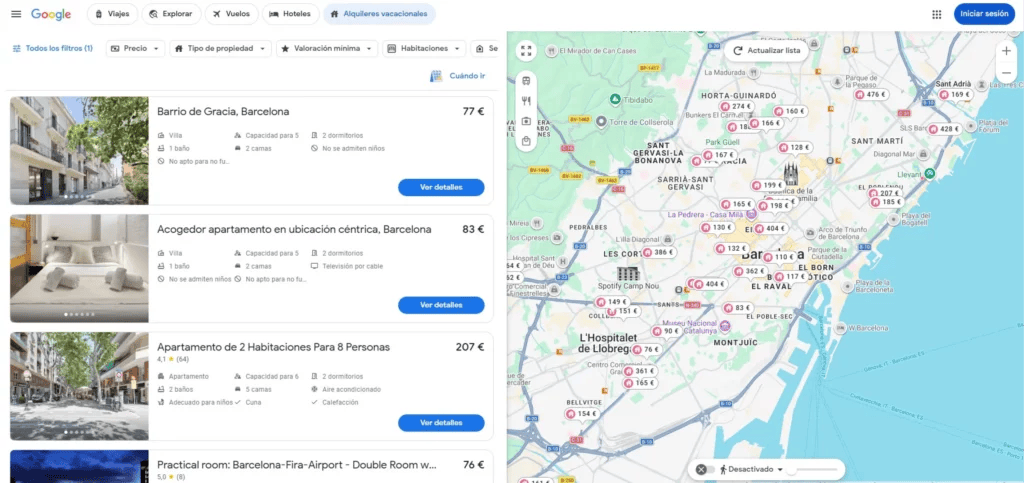
To effectively locate hotels using Google Maps, begin by opening the app or website and typing your destination, specific address, or even a general area like "hotels in Miami" into the search bar. Google Maps will then display a range of hotel options on the map, often marked with red pins or price tags. Immediately, you can refine these results using the robust filtering options available. Look for filters such as "price," "ratings," "amenities" (like pools, Wi-Fi, or pet-friendly), and "check-in/check-out dates." Applying these filters narrows down the vast selection to properties that genuinely meet your specific travel requirements and budget, saving you considerable time and effort in the initial search phase.
These filters are crucial for tailoring your search, allowing you to prioritize what matters most for your trip. For instance, if you are traveling with family, you might filter for hotels with a swimming pool and complimentary breakfast. Business travelers might prioritize strong Wi-Fi and proximity to convention centers. The intuitive design of Google Maps ensures that these filters are easy to access and apply, immediately updating the map and listing view. This dynamic filtering capability allows users to quickly iterate through different preferences, ensuring they discover the most suitable Google Map hotels without endlessly scrolling through irrelevant listings. Understanding how these tools work makes your hotel search experience significantly more productive.
Beyond standard filters, Google Maps also offers specialized search parameters. You can search for "boutique hotels NYC" or "hotels with free parking near me" to uncover more specific results. The platform intelligently interprets these natural language queries, delivering highly relevant options. Furthermore, zooming in and out on the map dynamically adjusts the displayed hotels, often revealing smaller, more localized accommodations that might not appear in a broader search. This geographical flexibility is particularly useful for finding hidden gems or hotels in very specific neighborhoods. Experimenting with both textual searches and map interactions helps you uncover the most precise and appealing hotel options for your travel needs.
What Key Features Help Compare Google Map Hotels?
Assessing Ratings, Reviews, and Pricing Data
When comparing Google Map hotels, several key features stand out as invaluable for making an informed decision. The star rating, prominently displayed, offers a quick overview of a hotel's general quality, based on aggregated user feedback. Delving into the detailed written reviews provides deeper insights into specific aspects like cleanliness, staff friendliness, room comfort, and noise levels. These firsthand accounts from previous guests often highlight pros and cons that official descriptions might overlook. Reading a diverse set of reviews helps paint a realistic picture of what to expect, allowing you to gauge if a particular hotel aligns with your expectations and preferences.
Pricing data is another critical comparison element within Google Maps. The platform often displays prices from multiple booking sites, allowing you to compare rates side-by-side without visiting numerous external websites. This direct comparison tool ensures you are getting the best possible deal for your chosen dates. Furthermore, Google Maps can show average price trends for specific hotels, helping you identify if the current rates are higher or lower than typical. This financial transparency empowers users to budget effectively and potentially identify opportunities for savings, making the transactional aspect of hotel search much more efficient and user-friendly for all kinds of travelers.
Beyond numerical ratings and prices, Google Maps offers rich visual content that aids comparison. High-quality photos of rooms, lobbies, and amenities provide a virtual tour, helping you visualize your potential stay. Street View integration allows you to virtually walk around the hotel's neighborhood, assessing its surroundings, proximity to restaurants, and overall vibe. This visual context is especially useful for understanding the local environment and ensuring the hotel's location meets your safety and convenience criteria. By combining textual reviews, comprehensive pricing, and immersive visuals, Google Maps provides a powerful suite of tools to compare various hotel options comprehensively and confidently.
Why Trust Google Maps for Your Next Hotel Stay?
Reliability and Comprehensive Information
Google Maps has earned its reputation as a trusted platform for finding hotels due to its consistent reliability and the sheer breadth of information it provides. The data it aggregates comes from numerous sources, including official hotel listings, user submissions, and popular booking websites, ensuring a broad and accurate representation of available options. This extensive data collection minimizes discrepancies and offers a more complete picture than relying on a single source. Travelers can depend on Google Maps to present current availability, up-to-date pricing, and relevant contact details, fostering a sense of security during the planning and booking process for their upcoming trips.
The platform's strength also lies in its strong emphasis on user-generated content, especially reviews and ratings. These insights come from real people who have stayed at the hotels, offering authentic perspectives that are critical for making informed decisions. Google Maps employs sophisticated algorithms to detect and filter out spam or fake reviews, striving to maintain the integrity of its feedback system. This commitment to genuine user experiences builds trust, as travelers know they are relying on a community-driven assessment rather than purely promotional material. It is a powerful aspect that differentiates Google Maps in the competitive travel search landscape, offering peace of mind to users.
Furthermore, Google Maps seamlessly integrates with other Google services, enhancing its utility. For example, if you have a Google Account, your search history and saved places can inform future hotel recommendations. Directions to your chosen hotel are just a click away, making the transition from booking to arrival effortless. The continuous updates and improvements to the platform ensure it remains current with travel trends and technological advancements. This dedication to user experience, combined with its robust data and community contributions, makes Google Maps an exceptionally trustworthy and efficient tool for planning any hotel stay, regardless of your destination in the U.S. or beyond.
How to Compare Hotel Options Effectively on Google Maps?
Leveraging Advanced Search and Visual Tools
Comparing hotel options effectively on Google Maps involves more than just glancing at prices; it requires strategic use of its advanced search features and visual aids. Once you have a list of potential hotels, utilize the "compare rooms" function, often available on a specific hotel's detail page. This allows you to see different room types, their amenities, and corresponding prices at a glance. It helps discern value, for instance, if a slightly more expensive room offers significantly better features like a view or extra space. Such direct comparisons are crucial for deciding if an upgrade is worth the cost, ensuring you align your booking with your comfort and budget requirements.
Beyond direct room comparisons, leverage the map view itself to assess proximity to key points of interest. Pin your desired attractions, event venues, or business locations on the map, then observe how close each hotel is. Google Maps can also display public transport routes and walking distances, which are vital for understanding the practicalities of a hotel's location. A hotel might be cheaper, but if it requires extensive travel to your primary destinations, the savings might be negated by transport costs or lost time. This spatial analysis provides an often-overlooked but essential layer of comparison, guiding you toward a location that enhances your overall trip experience.
Finally, pay close attention to the visual elements and street view features when comparing Google Map hotels. Examine hotel photos critically, looking for signs of recent renovations, cleanliness, and the general ambiance. Use Street View to virtually explore the immediate neighborhood, checking for nearby amenities like grocery stores, pharmacies, or coffee shops, which can significantly impact your stay's convenience. Also, note any potential noise sources like busy roads or construction. By combining detailed room information, spatial analysis, and visual inspections, you can conduct a thorough and effective comparison, leading to a hotel choice that truly fits your needs and enhances your travels in 2026.
Frequently Asked Questions
Can I filter Google Map hotels by specific amenities like a pool or gym?
Yes, Google Maps provides robust filtering options that allow you to refine your hotel search by specific amenities. After searching for hotels in your desired area, look for the "More filters" option. Here, you can select specific features such as a swimming pool, fitness center, free Wi-Fi, pet-friendly policies, parking, or complimentary breakfast. Applying these filters instantly updates your results to show only hotels that match your precise amenity requirements, streamlining your search significantly for a comfortable stay.
How accurate are the hotel prices displayed on Google Maps?
Google Maps strives for high accuracy in displaying hotel prices by aggregating data from various online travel agencies and the hotels themselves. While prices are generally up-to-date, they can fluctuate rapidly due to demand and availability. It is always recommended to click through to the booking site for the final, confirmed price before making a reservation. Google Maps serves as an excellent starting point for price comparison, offering a reliable estimate for your budget planning.
Does Google Maps show hotel availability in real-time?
Google Maps integrates with hotel booking systems to provide near real-time availability. When you specify your check-in and check-out dates, the platform typically displays hotels that have rooms available for those periods. However, given how quickly hotel inventory can change, especially during peak seasons or for popular destinations, confirming availability directly on the booking partner's website is the most reliable approach right before you finalize a reservation. This ensures you secure your desired room.
finding hotels on Google Maps, hotel location search, compare hotel prices Google Maps, Google Maps hotel reviews, how to book hotels via Google Maps, nearby hotels on Google Maps, Google Map hotel availability, best hotels near me


C Mo Dominar Las Rese As De Google Una Gu A Completa 66af75e735f5167edb94df69 648badc134e495735e767e40 Sample Overview Hotels Listing 66af75e735f5167edb94df69 648badc134e495735e767e40 Maps Update Explained Changes In Results Bigwave Sozopol Vacation Rentals 2026 Qu Es Y Aparecer Grid Why Book Using And The Ultimate Guide To Navigating Future Of Hotel 238E129D 6d09 4a95 89FC 2f55a8158568 238E129D 6d09 4a95 89FC 2f55a8158568 Your Points Guy Ads Mews How I Use Find Cheap Deals Gina On Plane GMHOTELS4 Configure Optimize My Business Listings For 63C16BD3ECB4E2375CC036CA Min 63C16BD3ECB4E2375CC036CA Best Family Trips Sip Bite Go Accommodation Price Youtube Maxresdefault Nearby 2025.


Google Hotel Ads Everything You Need To Know 10217151942338712 Descubre Los MEJORES Hoteles En MAPS AHORA How I Use Find Cheap Deals Gina On A Plane GMHOTELS2 Business Profiles For Hotels The Ultimate Guide Screenshot Honolulu Best Tips List Your Update 2023 TRAVELER Image Increase Direct Bookings Through S Search Platform 1737042600 Perfect Location Prices Youtube Maxresdefault AI 2026 Ask Immersive 3D Navigation 2026 Maximisez Vos R Servations D H Tels Avec Complet 64a41e2948d7f2251f04bca5 Altelis Bordeaux 64a41e2948d7f2251f04bca5 Rank Higher 2223 Hubspot Blog Header With Guideline 2223 2023 In 2026 Local SEO Checklist Fast 2026 Hero 2026.


Why Is Google Maps Trending In 2026 The AI Features Numbers And 2026 Update Local Businesses 2026 Hotel Destination Guide STAY Cityintegrations Optimization For Hotels Barnes Creative Studios Business Profile Image Page 2026 Brings Ask 3D Navigation Roll Out 2026 Complete Independent 2026 Banner De Youtube Moderno Llamativo Coloridoingles 2026 Location Map 2026 ALA Annual Conference Exhibition 2026 Chicago 2026 How To Get Show Along Your Route Do I Use Data Scraping Step By Outscraper Optimizing S 2021 Screenshot 2021 At 2021 Mapa Gratuito Las Vegas Descargar En Pdf XHERR.